Key Points
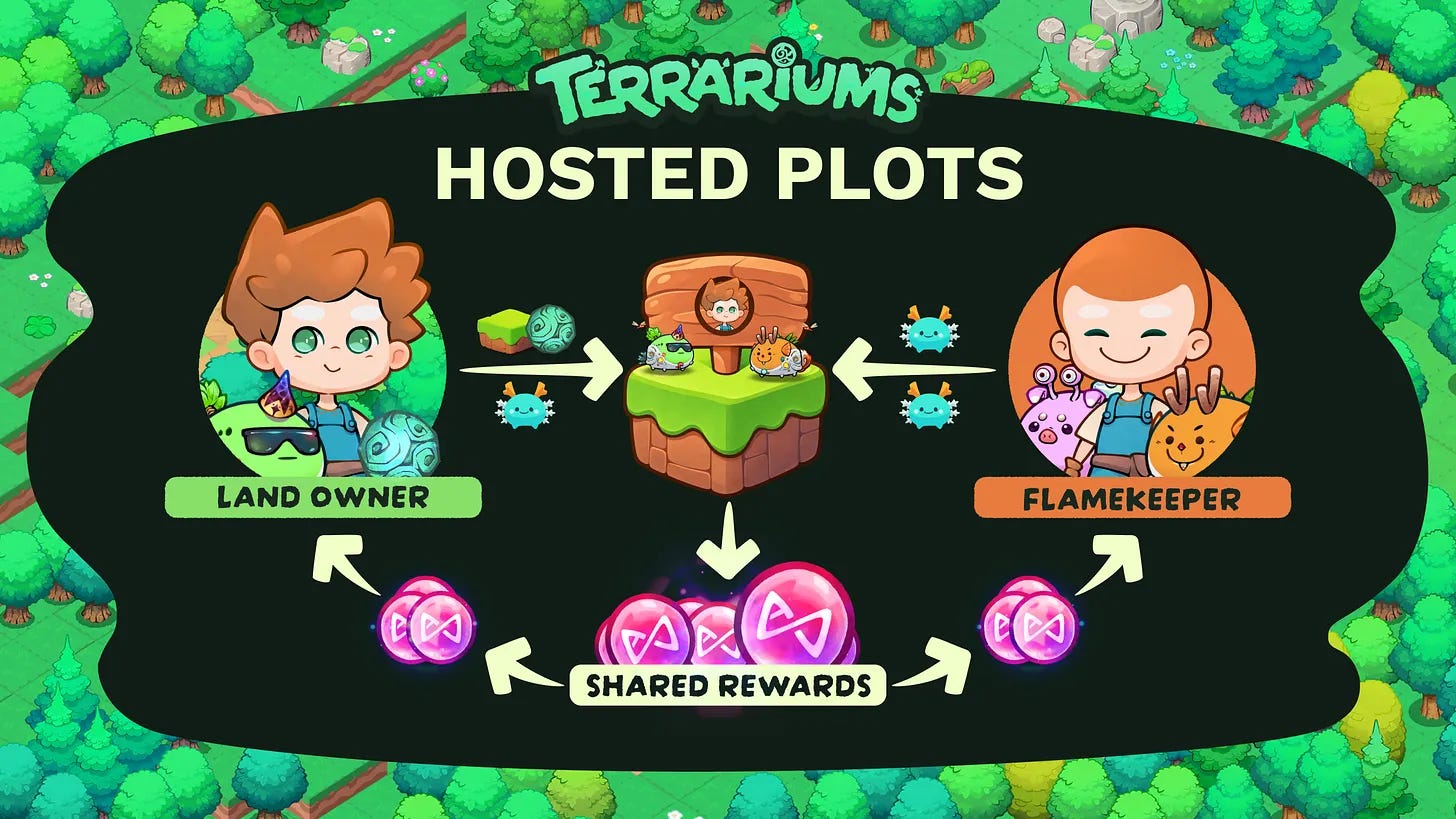
Hosted Plots are LIVE! Land Owners can now open their plots to Flamekeepers, who bring axies and share the bAXS those axies earn.
No Land? Join as a Flamekeeper. Browse public plots in the “Find a Plot” menu or enter an invite code. Flamekeepers pay nothing.
Land Owners set the shares. Each invite sets the Flamekeeper’s bAXS share for Local and Global Lunium ticks, at any percentage the Land Owner chooses. Your share applies to the bAXS your axies earn, rather than the whole plot’s reward.
One Lunacian brings the Land. Another brings the Flame.
As of today, they work the same plot.
Land Owners supply an activated plot and the Lunium that fuels it, with room for their own axies too. Flamekeepers bring axies and share in the bAXS those axies help earn.
Many of you have asked for delegation with the reward split built in. Hosted Plots brings that to Terrariums. It works like delegation, with the split set on the invite and paid out automatically every tick.
After we shared the rules on November 9, you also asked for full control over that split. As of launch, the share ranges are gone. Land Owners set any Flamekeeper share they choose.
Here’s how to start on either side:
For Land Owners: Host a Plot
Your plot needs to be active in Terrariums first. To activate it, open Town Registry → Plots → Activate Land, select your plot, and confirm in your wallet.
Then:
Open Town Registry and select the plot you want to host.
Open the Flamekeepers tab.
Select Enable Hosting.
Create an invite and set its terms: public or private, the Flamekeeper’s bAXS share for Local and Global Lunium ticks, any minimum Atia’s Flame per axie, and auto-accept or manual approval.
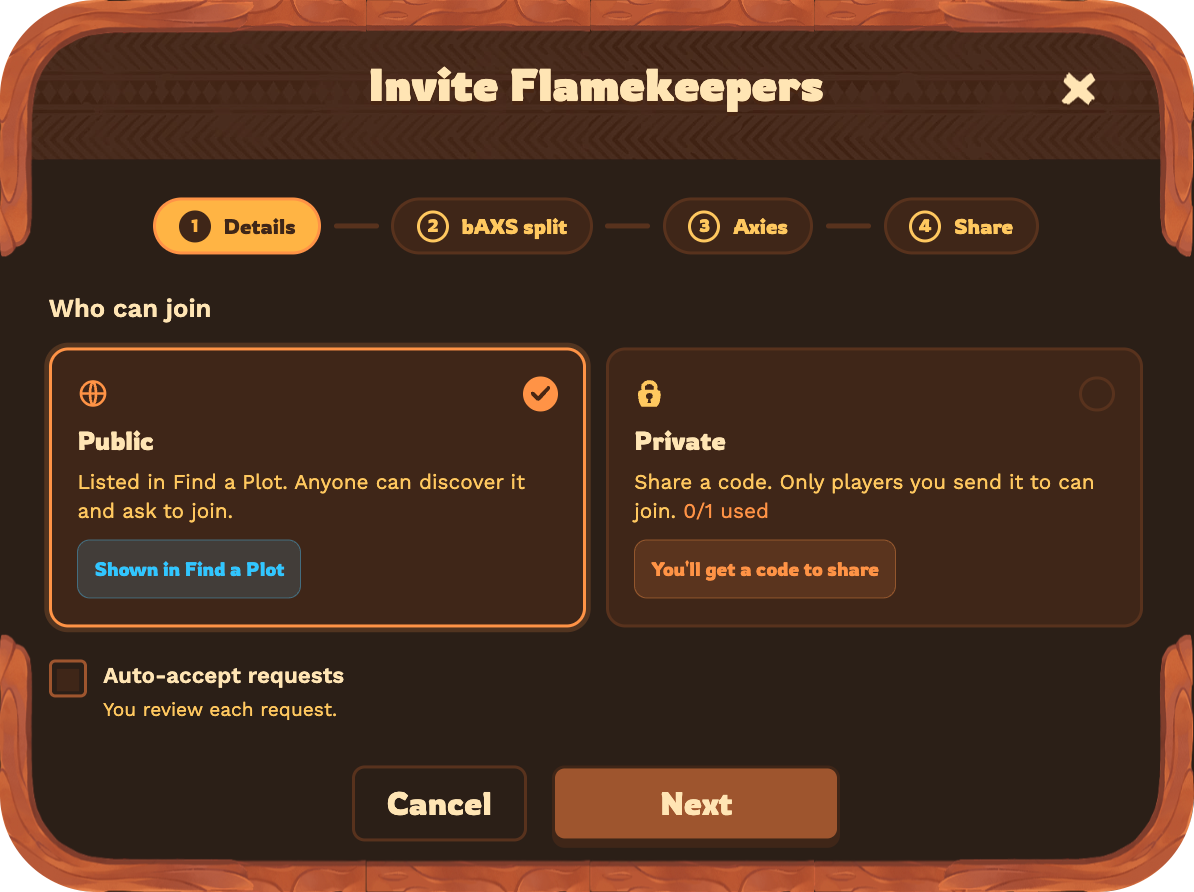
Your plot is now open to Flamekeepers. For a private invite, share the code with the Lunacians you want to host. With manual approval on, incoming requests appear on your plot.
For Flamekeepers: Join a Plot
Any Lunacian with axies can join a hosted plot, Land Owners included.
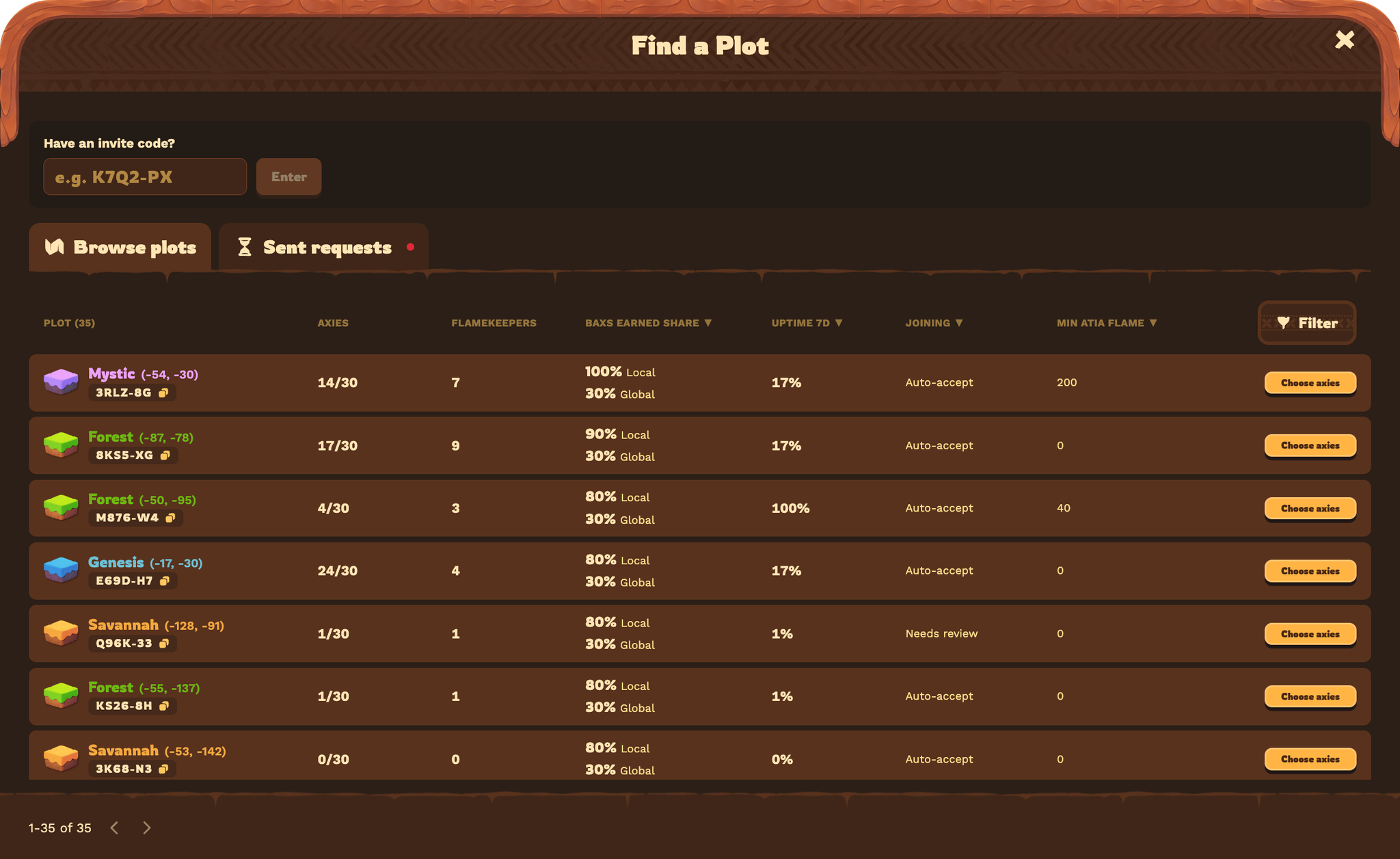
Open Terrariums and select Find a Plot on the home screen.
Browse public plots and select Choose Axies on the one you want, or enter an invite code to go straight to a private invite.
Check the terms and pick your axies. Read both bAXS shares. If the invite sets a minimum Atia’s Flame, every axie you choose must meet it.
Submit your request. With auto-accept on, you join right away. Otherwise, the Land Owner approves your request first. Your axies start contributing at the next tick.
Each axie works one plot at a time, and a plot holds up to 30 axies in total. To join more plots, bring different axies.
How Invites Set the Split
The Land Owner sets the Flamekeeper’s bAXS share on each invite. Two things decide which share applies on a given tick: the Lunium the plot burns, and the invite the Flamekeeper joined through.
Two shares: Local and Global Lunium
Each invite sets two bAXS shares for the Flamekeeper, one for each type of Lunium the plot burns:
Local Lunium is free and regenerates on the Land Owner’s plot. When a tick burns Local Lunium, the Flamekeeper keeps the invite’s Local share of their axies’ bAXS.
Global Lunium is the Lunium Land Owners buy in the Shop. When a tick burns Global Lunium, the Flamekeeper keeps the invite’s Global share.
Land Owners set both shares at any percentage they choose.
Two invites: public and private
Each plot can run one active public invite and one active private invite at the same time, each with its own terms.
Public invites appear in the “Find a Plot” menu, where any Lunacian can browse and request to join.
Private invites work by code. The Land Owner shares the code with the players they choose.
That lets a Land Owner offer different terms on the same plot. For example:
Public invite: 80% on Local Lunium ticks, 40% on Global Lunium ticks
Private invite: 90% on Local Lunium ticks, 50% on Global Lunium ticks
On a Local tick, Flamekeepers from the public invite keep 80% of the bAXS their axies earn, and those from the private invite keep 90%. On a Global tick, they keep 40% and 50%.
How Your Share Is Calculated
Every hour, at each tick, Terrariums splits the plot’s bAXS in two steps:
Count the Flame. Each player’s axies earn the same share of the plot’s bAXS as their share of its Atia’s Flame. Bring one-third of the Flame, and one-third of that tick’s bAXS goes to your axies.
Apply the invite share. The Flamekeeper keeps their invite’s percentage of that portion. The Land Owner keeps the rest, plus everything their own axies earn.
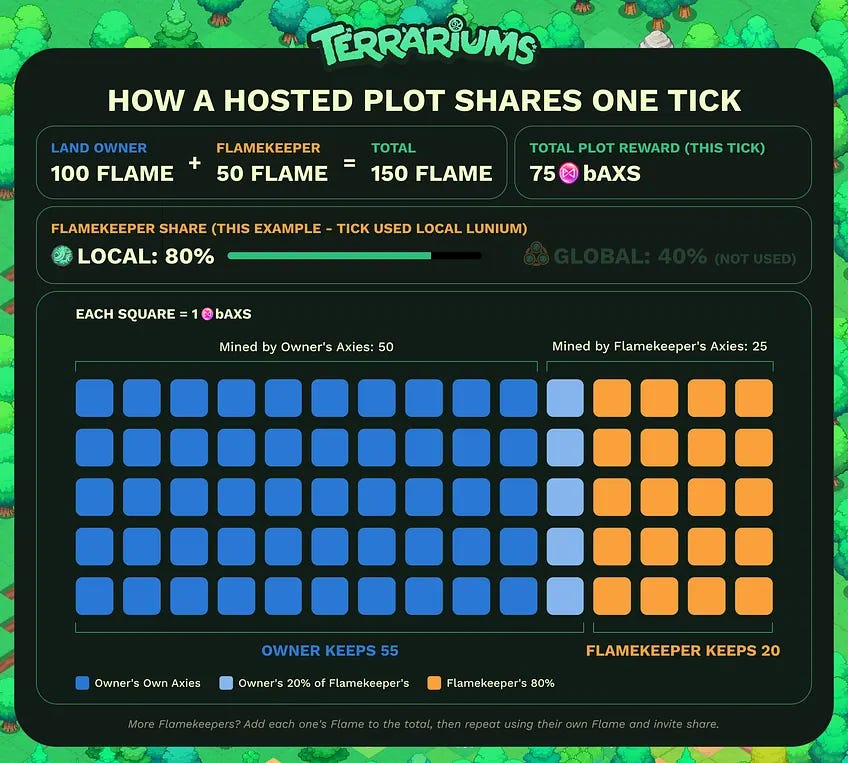
Example 1: One Flamekeeper
Take a plot that earns 75 bAXS on a tick that burns Local Lunium. The Land Owner’s axies bring 100 Flame. One Flamekeeper’s axies bring 50 Flame, on an invite with an 80% Local share.
Count the Flame: The plot holds 150 Flame. The Land Owner’s axies bring two-thirds, so 50 bAXS goes to them. The Flamekeeper’s axies bring one-third, so 25 bAXS goes to them.
Apply the share: The Flamekeeper keeps 80% of 25 bAXS, which is 20 bAXS. The other 5 bAXS goes to the Land Owner, who ends the tick with 55 bAXS.
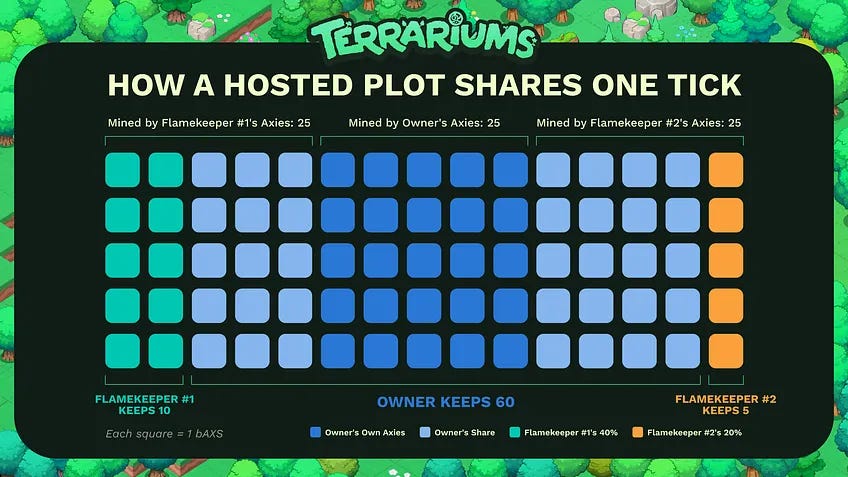
Example 2: Two Flamekeepers, Two Invites
With more Flamekeepers, add every axie’s Flame to the plot total first. Then apply each Flamekeeper’s own invite share to their portion.
Now take a different plot that earns 75 bAXS on a tick that burns Global Lunium. The Land Owner’s axies bring 50 Flame. Two Flamekeepers’ axies bring 50 Flame each. One joined through the private invite at a 40% Global share, and the other through the public invite at a 20% Global share.
Count the Flame: The plot holds 150 Flame. Each player’s axies bring one-third, so 25 bAXS goes to each.
Apply each share: The private-invite Flamekeeper keeps 40% of 25 bAXS, which is 10 bAXS. The public-invite Flamekeeper keeps 20%, which is 5 bAXS. The other 35 bAXS goes to the Land Owner, who ends the tick with 60 bAXS.
Note: Actual plot rewards vary from tick to tick.
Check Your Rewards
Terrariums splits the rewards automatically and adds each share to that player’s claimable balance.
Land Owners: Open the plot’s Atia Shrine to see rewards per tick and the share that went to Flamekeepers.
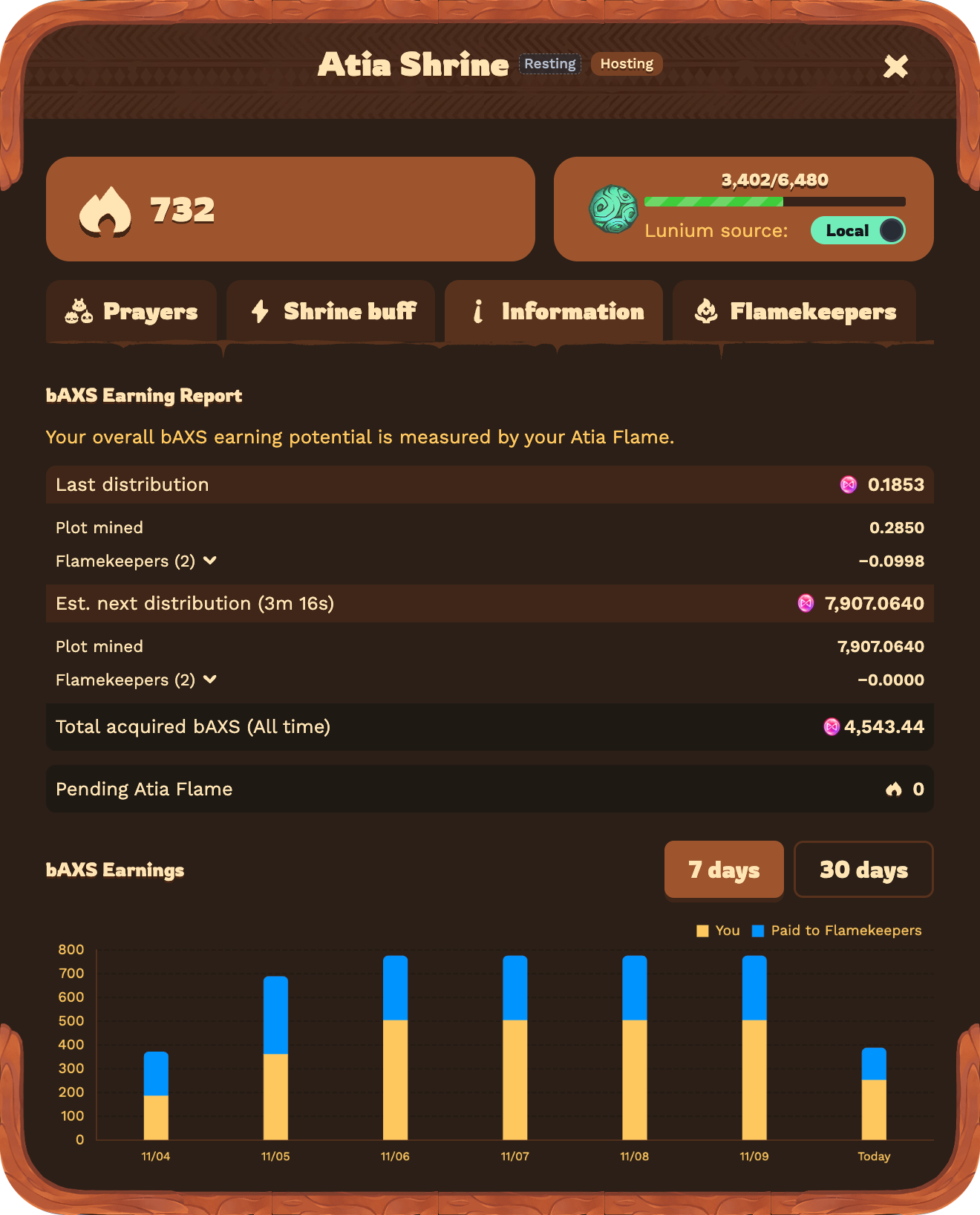
Flamekeepers: Open Town Registry and select the plot you joined to see your own rewards per tick.
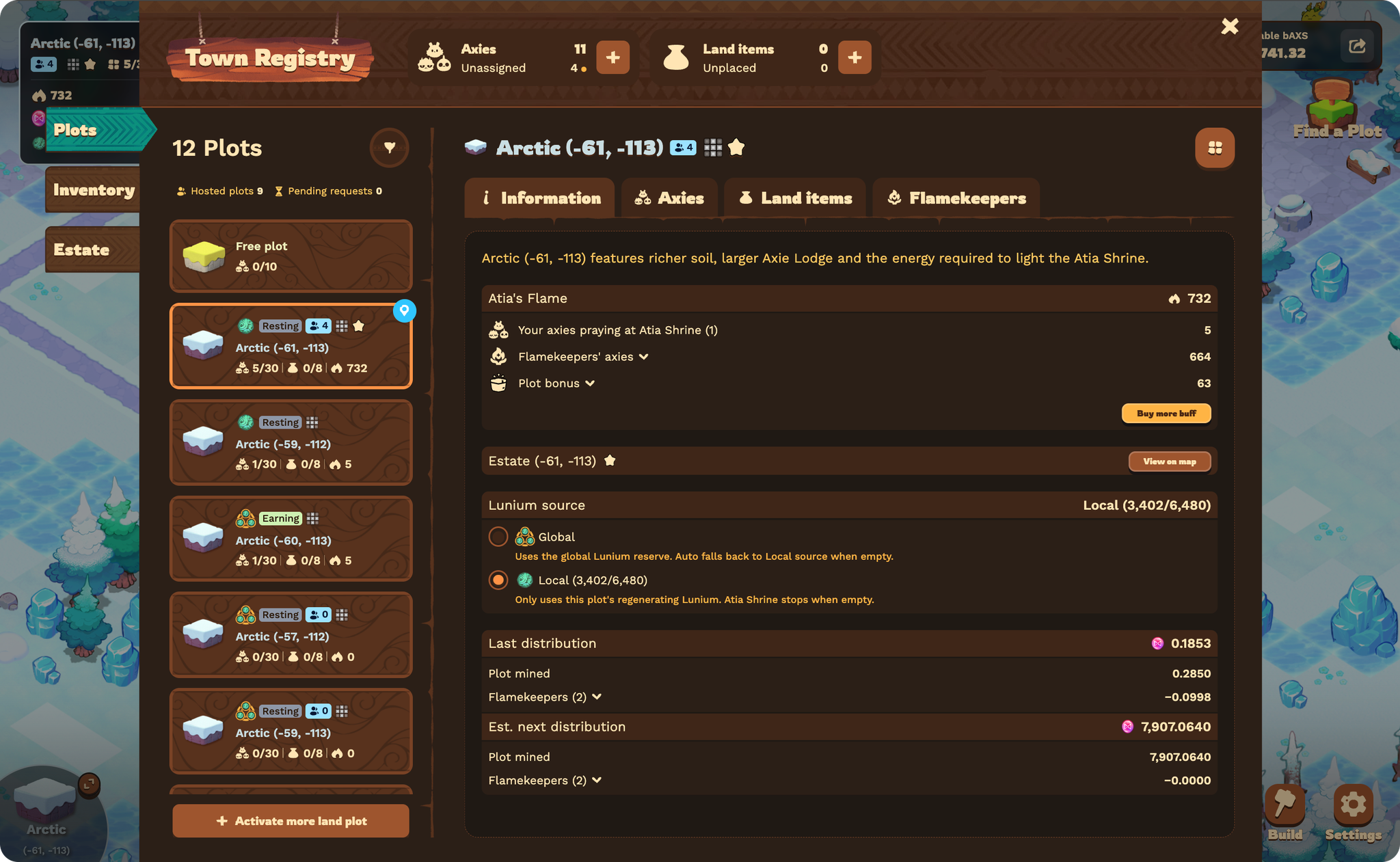
If Plans Change
Flamekeepers can leave at any time.
Revoking an invite closes it to new players. Flamekeepers who joined through it stay on their original terms.
Editing an invite applies its new shares to players who join after the change. Flamekeepers already on the plot keep the shares they joined with.
Find a Plot or Your Next Flamekeeper
Have room on your Land? Create a public invite so other Lunacians can find it.
Looking for a home for your axies? Start with the “Find a Plot” menu, or meet Land Owners and Flamekeepers in #flamekeeper-applications on the Axie Discord.